Spinning Up Personal Agents
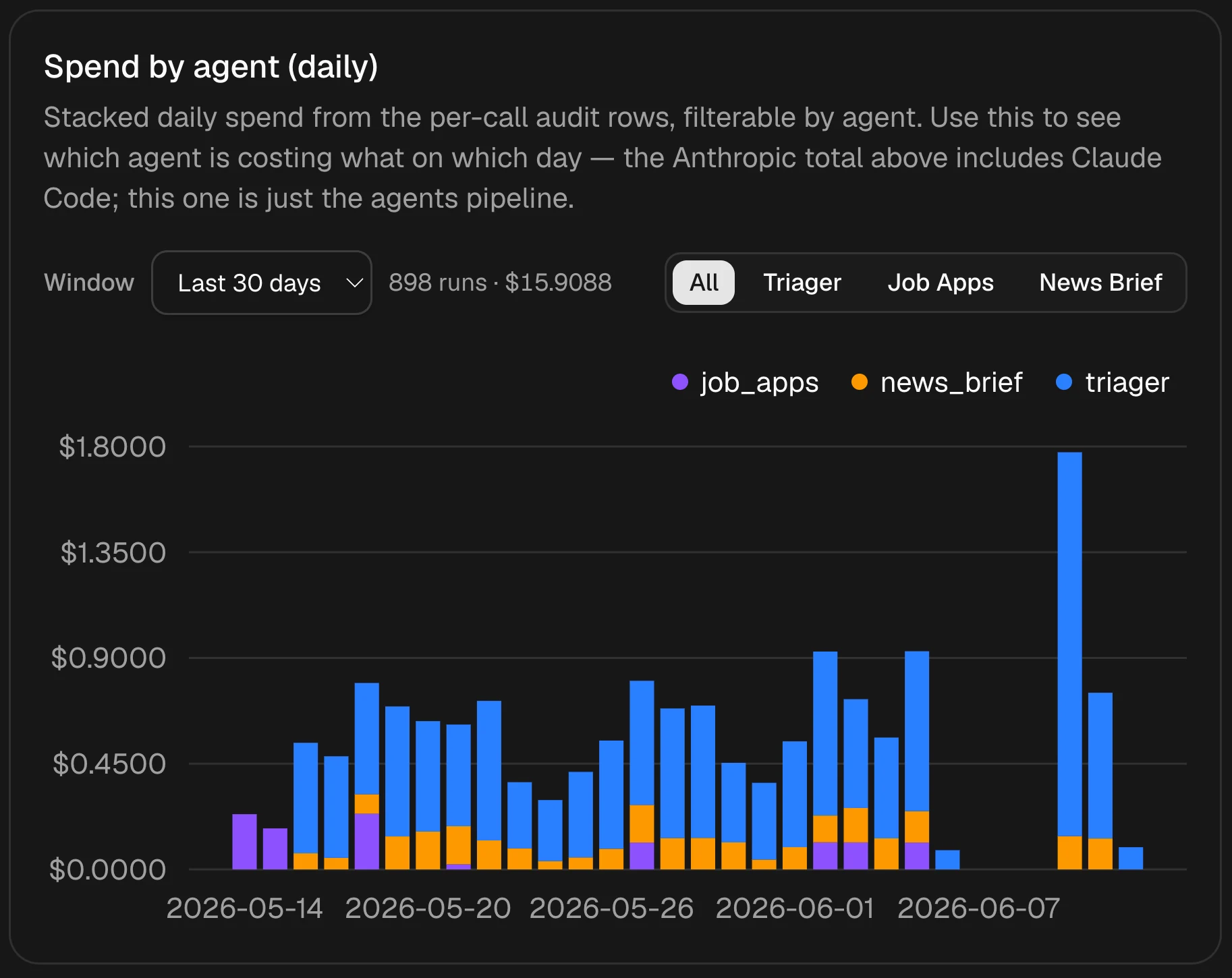
Notion Custom Agents impressed me, but lacked important metrics and would have cost over $500/mo. So I rebuilt them as my own serverless system for ~$20 a month, with detailed latency metrics for every run and a full cost dashboard.
· 5 min read
Running My Own #
NOTE: I also made a splashy, product-oriented version of this post, so feel free to check it out if you’re interested.
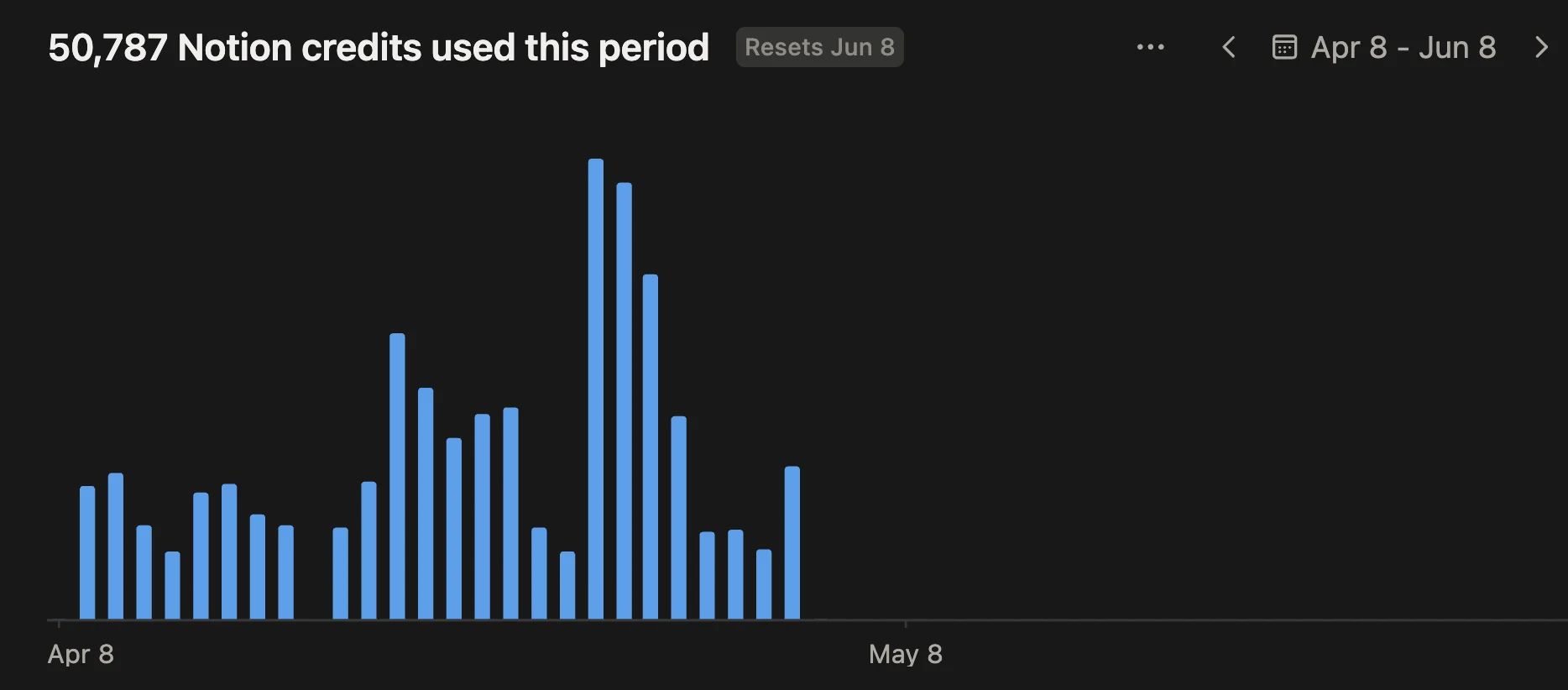
When Notion launched Custom Agents, I set up 3 during the trial period: one that labels all incoming email, one that could track my future job applications, and one that summarizes news from The Information and NYT newsletters for a morning digest. Setup was dead simple with a few prompts, and within a week I depended on all 3 agents. But I couldn’t see how the agents were performing. I wanted model comparisons, latency, and token usage, and I wanted to use those numbers to make the agents better. When the trial period for Custom Agents was up, the agents burned through what would have been $507 if credits were charged for that month. So I rebuilt the agents myself, with a budget of $20 a month.
MY APPROACH: I set up the engineering infrastructure I had skipped on ChatGPT Wrapped: CI, type checking, and database migrations. The system itself is serverless end to end because my traffic is tiny and all the idle time on a permanent server would cost more. Each agent is its own FastAPI app on Modal so that it spins up only when triggered and then quickly exits. Every run writes an audit row (tokens, latency, cost) to a serverless Postgres database on Neon. I run a small Next.js dashboard on Vercel just for myself to monitor latency and costs. When I receive an email, Gmail pushes an event through Google Pub/Sub to the Triager module, which uses Claude Sonnet 4.6 to classify it into one of 12 labels. If the label is “Job Apps”, the Job Apps agent is triggered and finds the respective company in my Notion tracker to update. The news and morning brief agents run on morning crons for my daily reading.
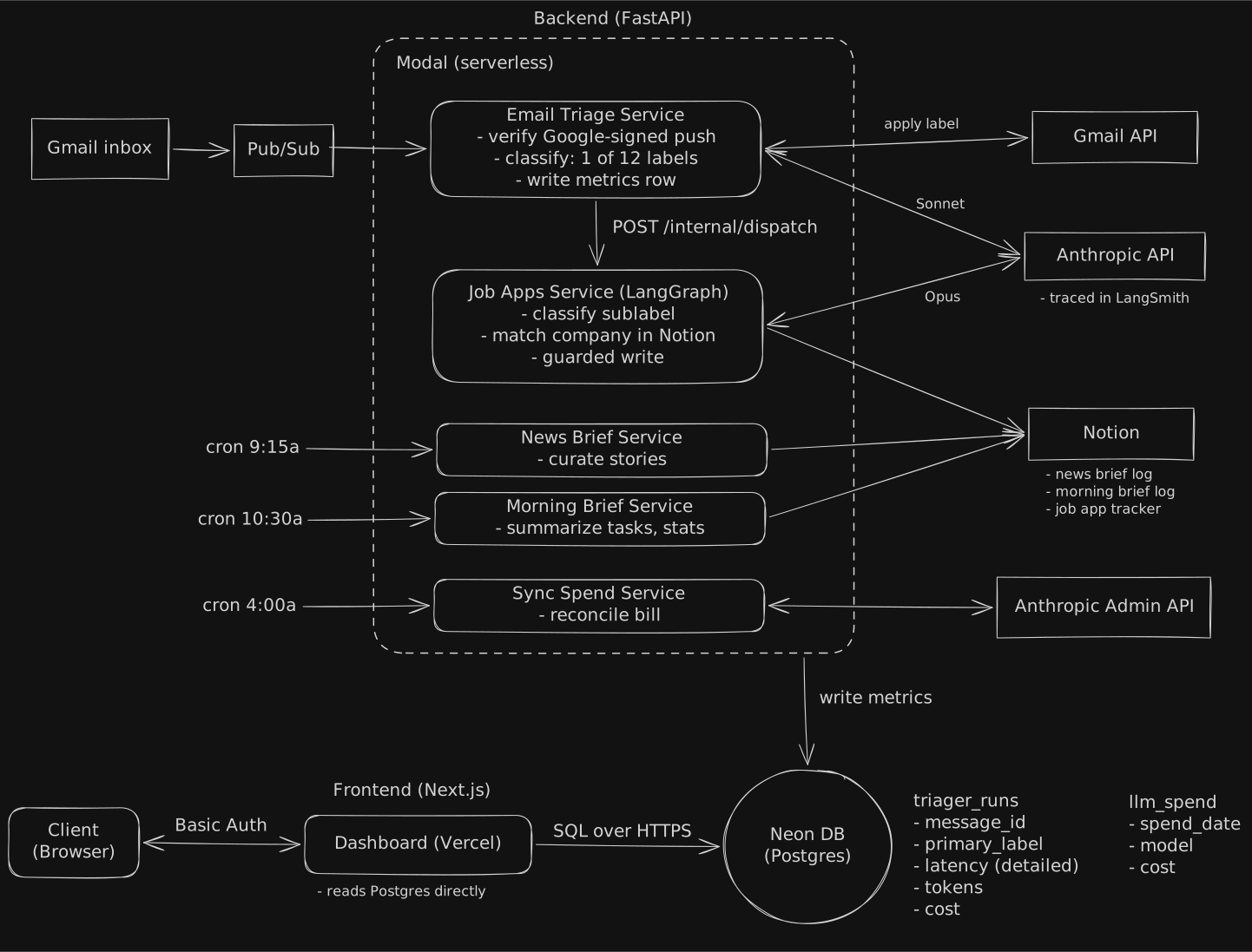
KEEPING IT UNDER $20: Luckily at my scale, the infrastructure all fits under the free tiers, so the Claude API is the only actual cost. I ran thorough backtesting to compare Sonnet 4.6 vs Opus 4.7 vs Haiku 4.5 vs my own preferences, and found Sonnet handles email classification nearly as well as Opus, which matched my own preferences almost perfectly. For the job apps, I used Opus 4.7 because it requires multiple semantic searches in Notion and must make decisions based on prior context (i.e. if the company is just emailing a status update). LangGraph proved to be quite helpful for constructing a graph for agentic decision making. Static prompts are cached and the reasoning budget per email is capped quite low.
THE LEARNING PROCESS: My biggest mistake is embarrassingly obvious in hindsight. The first version of the dashboard fetched every stat through Modal endpoints, so each click spun up a container just to query the database. The data was already sitting in Postgres on Neon, which allows for serverless queries. Once I let the dashboard query it directly, pages loaded much faster and I deleted 2k lines of API endpoints that were pointless. I also spent some time studying system design to get a much better grasp of how larger scale systems are built.
SECURITY: Security is, of course, critical but often overlooked in the age of vibe coding. I tried to take a more regimented approach and had Claude run an agent team to do adversarial security reviews of the codebase. This helped me to catch some oversights. Now, everything except the health checks requires authentication (Google tokens for the Gmail webhook, bearer tokens between services, basic auth on my personal dashboard). Secrets are also injected from 1Password locally and synced with Modal’s secrets.
HOW I WORKED: I built this with the help of Claude Code, and I reviewed every PR myself. Based on Boris Cherny’s helpful advice on X, I made use of loops, agent teams, and more recently, dynamic workflows. On the backend, Claude runs the test suite as it goes (576 tests as I write this). On the frontend, the Claude Chrome extension lets it click through the dashboard and debug what it sees, which mattered because I am much more backend-focused. Early on I moved from one agent to a team: a lead agent splits work across git worktrees so parallel agents don’t touch the same files, and a separate reviewer agent adversarially reviews their code and reports back. When Claude Code shipped dynamic workflows, I switched to that since it output JS code I could read and rerun. Running multiple agents helped ensure that my rules were followed and Claude could generate PRs that were manageable for me to review and merge in.
THE OUTCOME: It took 5 weeks to go from first commit to a system I rely on every day. The original 3 agents have grown to 5: a Morning Brief that assembles my tasks, calendar, email, and news into one page, and the admin Spend Sync. The Morning Brief went from idea to deployed in a day, which told me the platform underneath had worked. I focused on extensibility to allow for many more personal agents in the future. And most importantly, the Claude API bill comes to just under $20/mo.
THE FUTURE: As I spend more time learning system design, I’ve become very interested in the deployment of much larger scale agents. Latency, consistency, and correctness become much more important when thousands of people are using an agent at once. I’m eager to make use of the most sophisticated features of LangGraph for human-in-the-loop agents and long-term memory.
Code #
GitHub Repo (mirror of my code with prompts de-identified): agents_public